Lightweight Hardware Control for
Lenovo Gaming Laptops
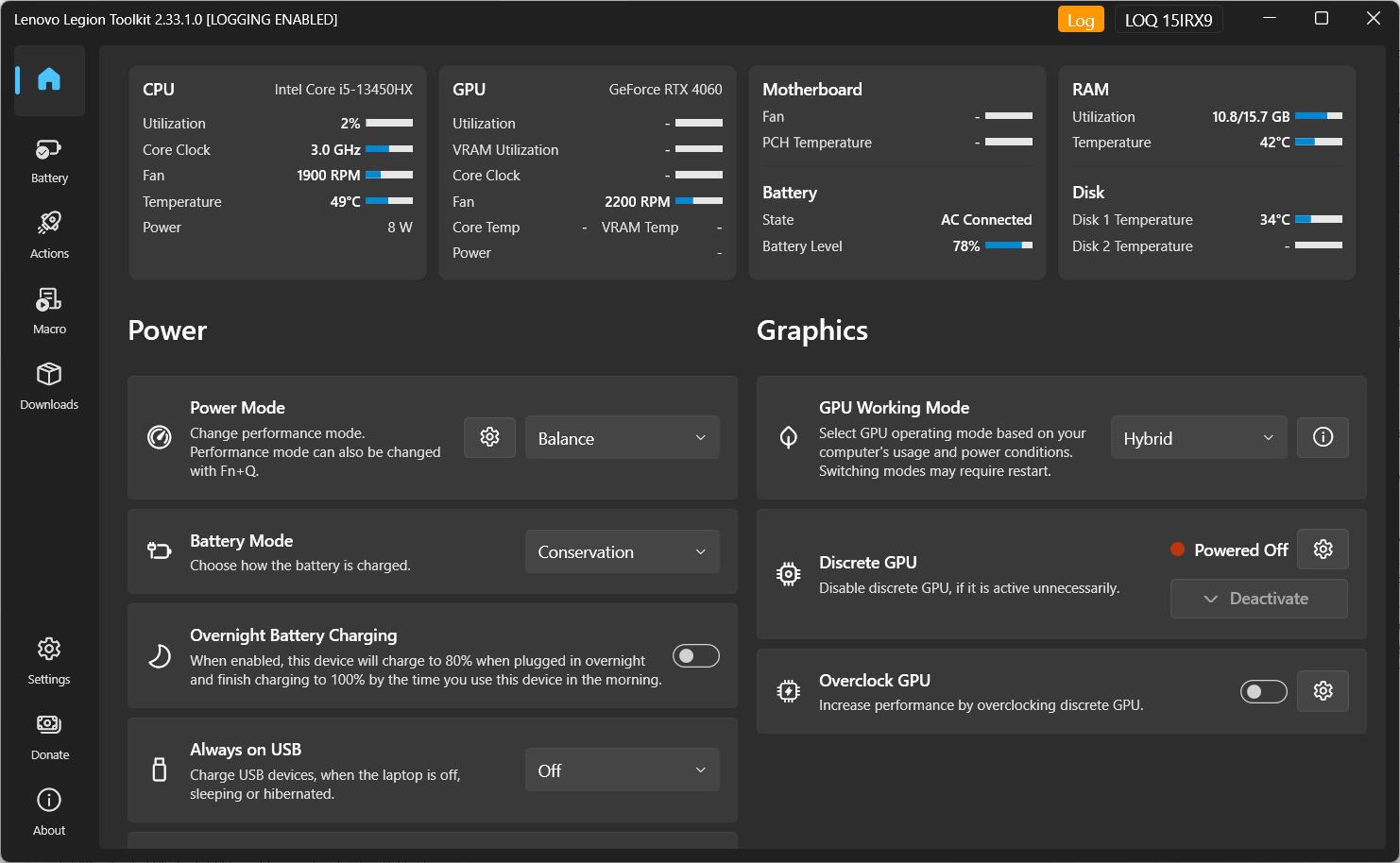
A dedicated Windows desktop utility created for Lenovo Legion, LOQ, Legion Go, IdeaPad Gaming, Lenovo Slim, and ThinkBook devices. Replaces Lenovo Vantage, Legion Zone, Legion Space, and Lenovo Hotkeys with zero background services, zero telemetry, and direct hardware control.
 Lenovo Legion Toolkit (LLT)
0
Background Services
~0%
Idle CPU Footprint
Gen 6 to 11
Hardware Generation Scope
.NET 9
Windows 10 / 11 Native
Hardware Control Without Background Overhead
Direct communication with laptop Embedded Controller (EC), ACPI, and WMI interfaces.
Power Modes & Power Limits
Switch between Quiet, Balance, Performance, Extreme, and Custom power profiles. On supported models, Custom Mode enables configuration of CPU power limits (PL1/PL2/PL4), CPU temperature limits, and GPU TGP targets.
Battery Charging Controls
Switch between Normal, Rapid Charge, and firmware Conservation Mode (60% on 2021 and earlier models, 80% on 2022 and later models), enable Overnight Battery Charging, and set custom Charge Threshold start and stop percentages on supported models.
Custom Fan Curves
10-point fan speed curve customization in Custom Mode on Gen 7 and newer laptops whose firmware exposes fan table registers. Includes manual Full Fan Speed toggle.
Hybrid GPU & Display Modes
Switch GPU Working Mode between dGPU, Hybrid, Hybrid iGPU-Only, Hybrid Auto, and UMA where the firmware reports support. Manage display refresh rate, resolution, display overdrive, and Auto Color Management.
Keyboard Lighting & Spectrum RGB
Manage Spectrum per-key RGB, 4-zone RGB, rear port and panel logo lighting, and 1-level or 3-level white backlighting without proprietary suites. Windows Dynamic Lighting integration is available on supported keyboards through an optional startup argument.
Actions, Macros & Smart Keys
Automate profile changes from AC power state, battery percentage, lid position, display or HDR events, Wi-Fi connectivity, session lock, or game launch. Assign Quick Actions to Fn keys with Smart Keys and show notifications when a key is pressed.
On-Screen Display & Sensors
Overlay live readings in a compact bar or a full panel, covering CPU, GPU, memory, storage, and PCH sensors plus FPS, 1% low, and frame time. Colors react to configurable warning and critical thresholds, and the Dashboard sensor items can be rearranged.
Driver Downloads & Updates
Browse Lenovo driver and software packages matched to your machine type and Windows version, filter to updates only, and pick between the Lenovo Vantage and Lenovo PC Support catalogs. The toolkit updates itself from Stable, Beta, or Dev channels on a configurable schedule.
Windows Integration
Mirror the active power mode to a Windows power mode or power plan, cycle refresh rates with Fn+R while excluding rates you never use, start at login with autorun, and choose which notifications are shown for each event.
Toolkit vs. Lenovo OEM Software Suites
Architectural differences between official Lenovo suites (Lenovo Vantage, Legion Zone, Legion Space, Lenovo Hotkeys) and a lightweight open-source utility.
| Characteristic | Lenovo Legion Toolkit | Lenovo OEM Suites (Vantage / Zone / Space / Hotkeys) |
|---|---|---|
| Background Services | 0 Services | Multiple persistent background daemons and driver helper services |
| Telemetry and Tracking | None (Zero Telemetry) | Background analytics and telemetry services enabled |
| Background Resource Usage | Virtually no CPU when idle | Persistent background CPU and memory overhead across suites |
| Software Conflict Control | Built-in option to disable Vantage, Legion Zone, Legion Space, and Hotkeys | Requires manual service manipulation or uninstallation to resolve conflicts |
| Command-Line Interface | Full CLI support via llt.exe | No command-line interface provided |
| Promotional Content | None | Marketing banners, subscription promotions, and third-party partner offers |
| License Model | Free and Open Source (GNU GPL-3.0) | Proprietary Closed Source |
Device Compatibility
Engineered for Lenovo gaming laptops from Generation 6 (2021) through Generation 11 (2026), with select feature support on Generation 5 (2020).
Legion Series
- Legion 5, Legion 5 Pro, Legion Slim 5
- Legion 7, Legion Pro 7, Legion Slim 7
- Legion 9i flagship models
- Legion Go handheld (8APU1)
- Chinese models (R7000, R9000, Y7000, Y9000, G5000)
LOQ Series
- Lenovo LOQ 15 (AMD and Intel)
- Lenovo LOQ 16 (AMD and Intel)
- Power modes, battery charge controls, refresh rate switching, and backlighting
IdeaPad Gaming & Other Devices
- IdeaPad Gaming 3 series
- Lenovo Slim models
- ThinkBook (power modes run through Lenovo ITS Mode)
- YOGA and XiaoXin variants (available features vary by model)
Lenovo desktops and laptop families outside this list are out of scope. A supported model can still lack individual features when its firmware does not report them.
Open Source Ecosystem & Libraries
Lenovo Legion Toolkit is supported by a modular ecosystem of dedicated, maintained .NET libraries and companion repositories.
LenovoLegionToolkit-Plugins
Modular DLL-based plugin library for extending toolkit features with custom fan curve algorithms, third-party integrations, and community extensions.
HarmonyBridge
Plugin module that gives other plugins runtime method patching through the Harmony library.
LibreHardwareMonitor
Maintained fork providing real-time sensor readouts for temperatures, fan RPMs, power limits, and clocks.
NvAPIWrapper
Managed .NET wrapper for the NVIDIA API, powering discrete GPU clock offsets, TGP power target offsets, and discrete GPU power state checks.
WindowsDisplayAPI
Managed .NET wrapper for the Windows CCD display APIs, used for refresh rate switching, display resolution, and Auto Color Management.
PresentMonFps
Managed .NET wrapper for Intel PresentMon, delivering real-time frame rate and frame time metrics for the toolkit On-Screen Display (OSD).
ZenStates-Core
Low-level .NET library that talks to the AMD Ryzen SMU, used for Precision Boost Overdrive, Curve Optimizer and Curve Shaper margins, and power limits.
Support the Maintainers
Lenovo Legion Toolkit is free, open source, and actively maintained by Dr. Skinner and Kaguya. If this tool is useful to you, consider supporting their work.
Dr. Skinner
Leads the project and is responsible for core feature development, quality assurance, UI/UX design, hardware research, and reverse engineering.
Kaguya
Specializes in hardware research and reverse engineering, with contributions spanning core feature development and low-level system integration.
Frequently Asked Questions
Technical guidance grounded directly in the project codebase.
No. Open Settings -> Software Control and turn off the toggles for the suites that are installed: Disable Lenovo Vantage and ImController, Disable Lenovo Hotkeys, Disable Legion Zone, and Disable Legion Space. Disabling them halts their services, scheduled tasks, and processes and avoids hardware communication conflicts without removing the applications.
On clean Windows installations, ensure Lenovo Energy Management and Lenovo Vantage Gaming Feature Driver are installed so hardware interfaces are accessible. These drivers are not required on Generation 10 and newer hardware.
The Conservation Mode percentage is fixed in the laptop Embedded Controller firmware at 60% on 2021 and earlier models, or 80% on 2022 and later models. Models whose Lenovo power management driver exposes the PWRMGRV charge threshold keys also get a separate Charge Threshold setting with custom start and stop percentages.
Custom fan curves are supported in Custom Mode on Generation 7 (2022) and newer laptops whose firmware exposes fan table registers. Custom fan curves are not available in Quiet, Balance, or Performance modes, nor on Generation 6 and older models due to hardware limitations.
The application interacts with low-level Windows APIs (WMI, EC driver communication, keyboard hooks) which can trigger generic heuristic scanner alerts. All release installers are built publicly via GitHub Actions and signed with the project certificate, which the built-in updater validates before installing an update.
Yes, for every feature that reacts to system state. The toolkit installs no background service, so power mode and power plan synchronization, Actions, macros, and the on-screen display only run while the app is active. Enable Autorun and Minimize on Close in Settings -> App Behavior so it stays available in the system tray.
Those modes are refused while the AC adapter is disconnected, because power limits are not applied correctly on battery power. The --allow-all-power-modes-on-battery startup argument removes the restriction, but settings may then be applied incorrectly and such configurations are unsupported.
That message comes from the installer bootstrap, not from Lenovo Legion Toolkit. Setup unpacks its own files into a temporary folder under %LOCALAPPDATA%\Temp named like is-XXXXX.tmp before any application code runs, so the error means Windows refused to create that folder. Copy the installer to a plain local folder such as your Downloads folder (%USERPROFILE%\Downloads) and run it again, and confirm that %LOCALAPPDATA%\Temp exists, that your account can create a folder inside it, and that security software is not blocking writes there.